
Download iMeXoR – Free Video Frame Extractor for Windows, Mac, Android & iOS
Looking for a secure and easy way to extract high-quality images from your favorite movies? iMeXoR is a lightweight, free video frame extraction tool that lets you capture stunning stills from MPEG, AVI, and WMV files. Whether you're a film enthusiast, content creator, or just want a unique desktop wallpaper, iMeXoR makes it simple to save memorable scenes with just a few clicks.
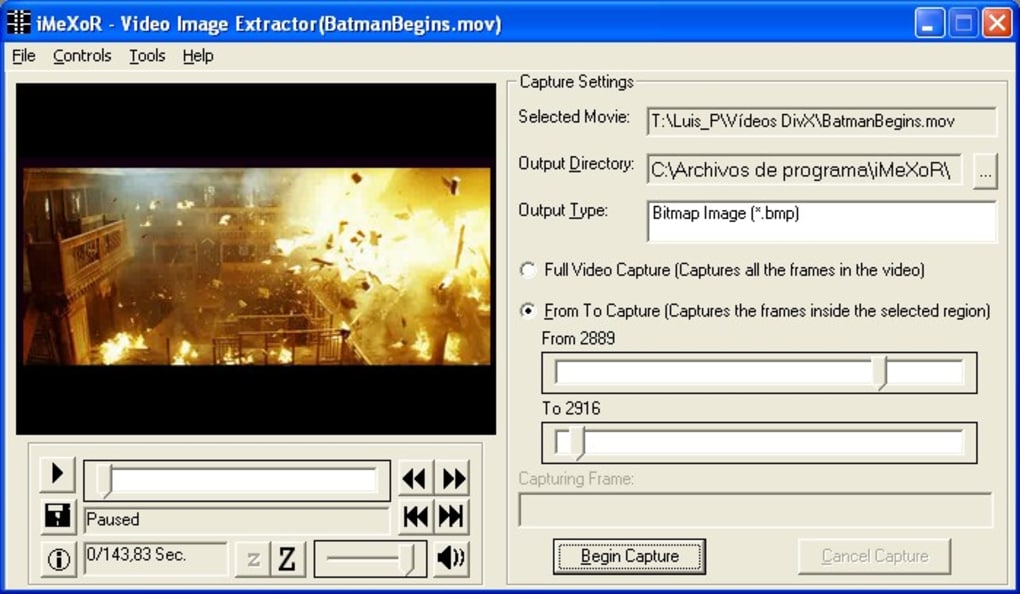
The intuitive interface allows you to preview video frames in real-time, set precise start and end points using progress bars, and choose your desired save location with ease. Despite minor compatibility issues with certain codecs and lack of support for DivX files, iMeXoR remains a reliable choice for quick, hassle-free image extraction. Download iMeXoR today and start preserving cinematic moments instantly.
Why iMeXoR Stands Out as a Top Video Frame Extraction Tool
When it comes to extracting images from video files, iMeXoR offers a refreshingly simple and efficient solution. Unlike complex video editing software that requires hours of learning, iMeXoR focuses on one core task: capturing still frames from movies. This laser-sharp focus results in a clean, clutter-free interface that’s perfect for beginners and casual users. The moment you launch the app, you’re greeted with a dual-pane layout—on the left, a real-time preview of your video, and on the right, a customizable save destination selector. This layout ensures you can see exactly what frame you’re capturing before saving it.
One of the standout features is the built-in progress bar, which functions similarly to professional video editors. You can scrub through the timeline, set precise start and end markers, and even adjust the frame capture point with pixel-level accuracy. Once you’re satisfied, simply click “Begin,” and within seconds, your chosen frame is saved to your specified folder. The tool supports popular video formats like MPEG, AVI, and WMV—formats commonly used in older or personal movie collections. For users who frequently watch films on DVD rips or legacy media, this compatibility is a major advantage.
Additionally, iMeXoR runs smoothly on both Windows and Mac systems, with no heavy resource demands. It doesn’t require a powerful GPU or extensive RAM, making it accessible to users with older machines. The app is also free to download and use, with no hidden in-app purchases or watermarks on exported images. While it lacks support for newer formats like DivX or MKV, its niche focus on legacy video types makes it a go-to tool for those with extensive archives of older films. Overall, iMeXoR delivers on its promise: fast, secure, and straightforward video frame extraction.
How to Use iMeXoR: Step-by-Step Installation & Setup Guide
Getting started with iMeXoR is quick and hassle-free. First, visit the official download page and click the “Download” button. The installer is lightweight—typically under 10MB—ensuring a fast download even on slower internet connections.
Once downloaded, run the installer and follow the on-screen prompts. The setup process is straightforward, requiring no advanced configuration. After installation, launch the app from your desktop or applications folder.
Upon first launch, you’ll be prompted to select the video file you want to extract frames from. Click the “Open” button and browse your local storage. iMeXoR supports drag-and-drop functionality, so you can also simply drag a video file into the app window. Once loaded, the left panel displays a real-time preview of the video. Use the progress bar at the bottom to scrub through the timeline, pause at the desired frame, and adjust the start and end markers if needed.
Next, navigate to the right panel to choose your save location. You can select any folder on your system—desktop, documents, or a custom folder. You can also customize the file name and format (PNG by default).
Click “Begin” to initiate the extraction process. The app will process the frame and save it instantly. For users managing multiple captures, iMeXoR remembers your last save location, streamlining the workflow.
It’s also worth noting that the app doesn’t require an internet connection after installation, ensuring privacy and offline functionality.
For users on Android or iOS, a mobile version is available via the respective app stores. While the mobile interface is slightly simplified, it retains core functionality, allowing frame capture from local video files. Keep your device updated to ensure compatibility with the latest video codecs and OS versions. Overall, iMeXoR’s installation and usage are designed with accessibility in mind—perfect for users who value simplicity and speed.
Compatibility, Features & Performance Overview
iMeXoR is engineered for broad compatibility across multiple platforms. It runs seamlessly on Windows 7 and later, including Windows 10 and 11, as well as macOS 10.12 and above. For mobile users, the app is available on both Android (5.0+) and iOS (11.0+), ensuring you can extract frames on the go. However, performance may vary slightly depending on your device’s hardware and installed codecs.
One of the app’s key strengths is its minimal system requirements. Unlike heavy video editing tools, iMeXoR uses under 50MB of RAM during operation and doesn’t rely on GPU acceleration. This makes it ideal for older computers or low-end laptops. The app also supports batch processing, allowing you to extract multiple frames from a single video without restarting the process.
Here’s a breakdown of its core features:
- Real-time video preview with timeline scrubbing
- Precise start/end frame selection using progress bars
- Customizable save location and file naming
- Support for MPEG, AVI, and WMV video formats
- Lightweight, fast, and free to use
- Cross-platform availability (Windows, Mac, Android, iOS)
Despite its strengths, there are a few limitations. The app doesn’t support DivX, MKV, or MP4 files out of the box, which may frustrate users with modern video libraries. Additionally, the default output format is PNG, which results in larger file sizes. However, this can be resolved by using a free image converter after export. Some users with conflicting codecs may experience preview lag, but this can be fixed by uninstalling unnecessary media codecs.
Pros & Cons: Is iMeXoR Right for You?
Before downloading, consider the following pros and cons to determine if iMeXoR fits your needs.
Pros
- Simple, intuitive interface ideal for beginners
- Fast and lightweight with minimal system impact
- Free to download and use with no ads or watermarks
- Real-time video preview and precise frame selection
- Available on Windows, Mac, Android, and iOS
Cons
- No support for DivX, MP4, or MKV formats
- Default output is PNG (larger file size)
- May have preview issues with conflicting codecs
- Limited editing features (no filters or cropping)
Frequently Asked Questions (FAQ)
Q: Is iMeXoR completely free to use?
Yes, iMeXoR is 100% free with no hidden costs, in-app purchases, or trial periods.
Q: Can I extract frames from MP4 files?
Currently, iMeXoR only supports MPEG, AVI, and WMV formats. For MP4 files, consider converting them to AVI first.
Q: Does iMeXoR work on Android and iOS?
Yes, the mobile versions are available on Google Play and the Apple App Store.
Q: How do I fix preview lag or playback issues?
Uninstall unnecessary media codecs or use a codec pack like K-Lite to ensure compatibility.
Q: Can I batch extract multiple frames?
Yes, you can extract multiple frames from a single video by adjusting the start and end markers and using the “Begin” function repeatedly.
Final Verdict: Download iMeXoR Today
If you’re a film lover, content creator, or just someone who enjoys saving iconic movie moments as desktop wallpapers, iMeXoR is a must-have tool. Its simplicity, speed, and cross-platform availability make it a standout choice among free video frame extractors. While it lacks support for modern formats like MP4 and DivX, its focus on legacy video types ensures reliable performance for users with older media libraries. The app is secure, lightweight, and doesn’t require an internet connection—perfect for privacy-conscious users.
With its intuitive design and minimal learning curve, iMeXoR empowers anyone to become a digital archivist of their favorite cinematic scenes. Whether you’re capturing a dramatic close-up or a nostalgic scene from a classic film, the process is as easy as a few clicks. Don’t miss out—download iMeXoR now and start preserving your favorite movie moments today.







